
Do you want to search in all categories or in this category ?

There are two types of preferences: manual and automatic.
Manual preferences can be accessed and updated from the "Preferences" section of the User menu.
Automatic preferences are settings saved automatically while you use the platform.
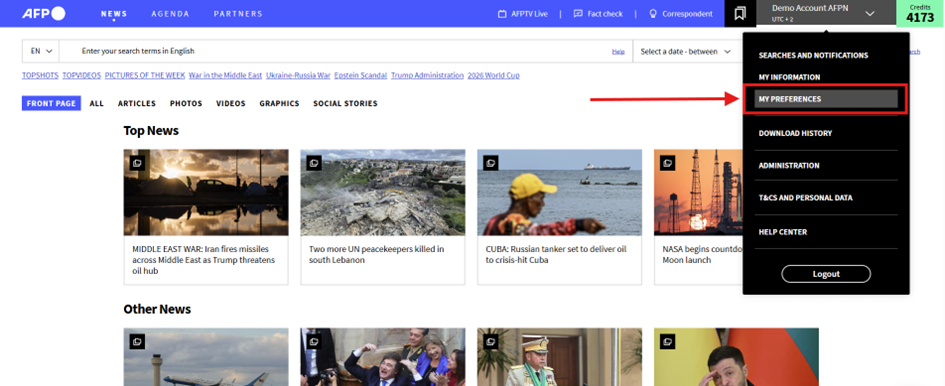
The interface language is the language in which the site interface is displayed (currently English, French, Spanish, Portuguese or German).
The country by default is the country that will appear in the "locations" filters and facets.
The date and time display interface formats.
These formats are taken into account in all date and time displays, except when a reduced format is required in the display, such as in an "event" item for example.
Most of the preferences are set automatically, thus avoiding laborious setup by the user. They are saved by default and, with a few exceptions, are available the next time the user logs on.
Time Zone
The time zone in which dates and times are displayed is set automatically according to the time zone of the computer on which the browser is running.
It is refreshed each time the user logs on to the platform.
Filters and panels
Your most recent filter selection is automatically applied when you return to the News feed, even after logging out and back in.
The Language, Video Formats and Video Collections filters are carried over as search facets and remain active until you choose to change them.
Facets are not retained outside the search context: when you return to the News feed, the Agenda or other sections, they are reset.
👉Learn more about filters and panels
Tabs
The last tab selected in the news stream is automatically selected as soon as you return to the news stream.
The last tab selected in the search result is automatically selected for any new search
Search language
The search language is initialized to the browser language and if changed by the user, this new search language will be stored for any future access
Downloadable Formats
The last selected download formats by the user are automatically selected when returning to the viewer.
Video Sound Activation
If the sound is activated or deactivated in a video in the video mosaic, it remains activated for the other videos in the mosaic.
If the sound is activated or deactivated in a video viewer, it remains activated or deactivated for any video viewed in a viewer.
These two choices are independent, so you can view the videos in the mosaic in a systematically soundless way, while viewing the videos in the viewer in a systematically speaking way.
When you connect again, however, the sound is systematically deactivated.
👂Share your thoughts on your AFP News experience to help us improve it. Your opinion matters.

